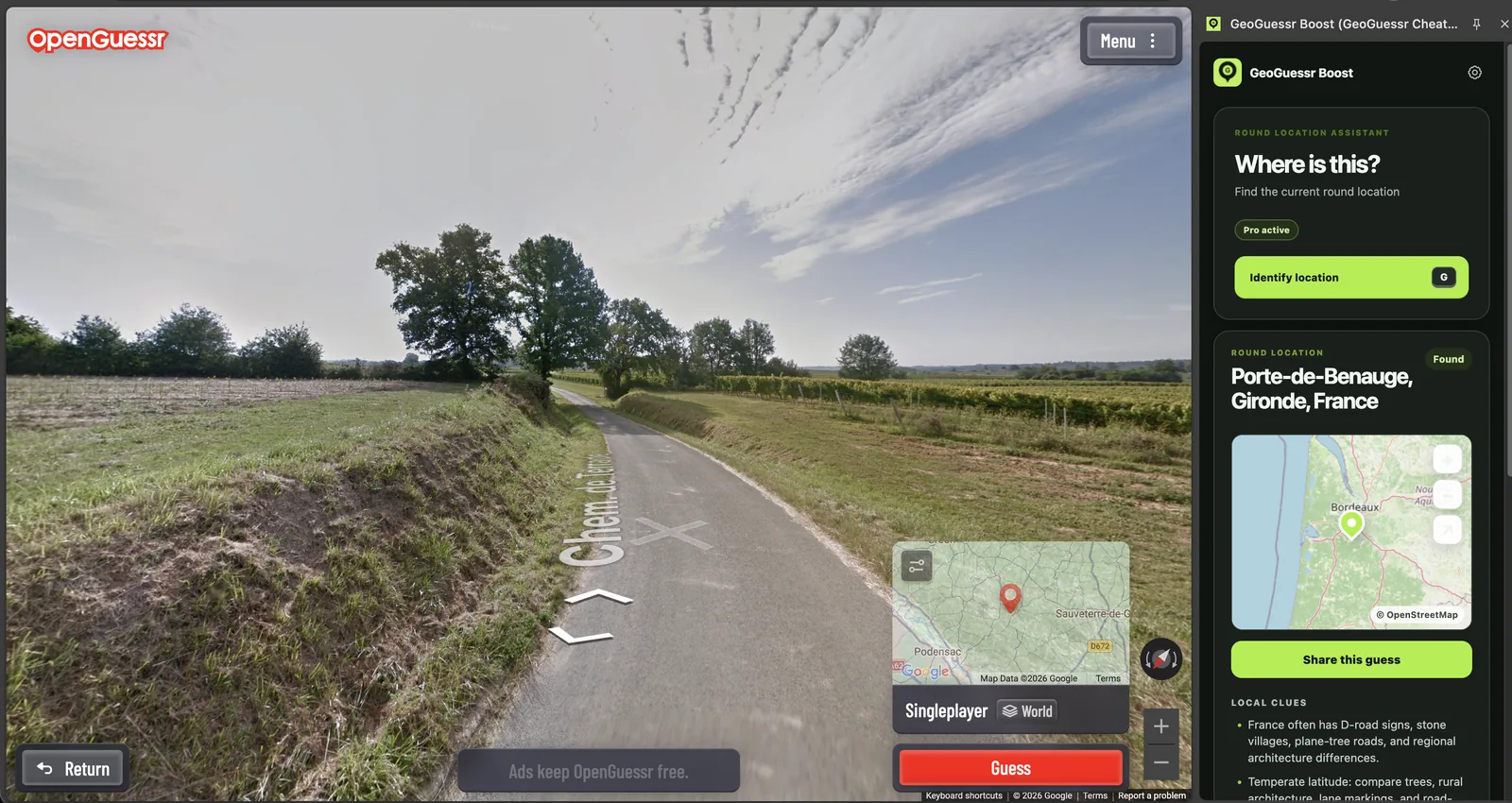
GeoBoost acts as an OpenGuessr cheat extension on compatible game pages. It identifies the current round, displays the place on a map, and adds local clues that can be used for deliberate practice.
What the extension returns
A useful OpenGuessr cheat must resolve the round without forcing the player to leave the game and search manually through map services. GeoBoost opens beside the supported round. After the shortcut is pressed, the panel shows a city or regional result, a map, and clue context when available.
The screenshot above is a real round in rural France. GeoBoost identifies Porte-de-Benauge in Gironde, while the map gives immediate context near Bordeaux. The scene itself contains useful evidence: narrow rural roads, vineyards, temperate vegetation, French mapping labels, and regional architecture. The point of the guide is not to pretend those clues are always obvious. It is to show how a confirmed answer can make them easier to recognize next time.
How to use an OpenGuessr cheat for practice
- Spend at least 20 seconds scanning the panorama before requesting a result.
- Choose one country and record the two clues that influenced the choice.
- Use the GeoBoost shortcut to identify the supported round.
- Compare the confirmed place with your evidence, not only with your country guess.
- Save one portable lesson, such as a road pattern, language cue, or landscape combination.
This approach keeps the mental work in the loop. If the extension is triggered immediately on every round, it can deliver the answer but provides little reason to remember it. Prediction followed by feedback creates a much stronger practice loop.
Location reveal and pin controls
On supported OpenGuessr formats, GeoBoost can identify the exact location and may place the pin using the current game controls. These are separate actions. A result can still be useful when automated placement is unavailable because the location, map, and clue context remain visible.
OpenGuessr can update its game interface independently. A major page change may temporarily affect round detection or control placement until compatibility is updated. Check the official GeoBoost site when a previously supported page stops responding.
Where not to use it
GeoBoost is intended for supported private, practice, testing, and casual party rounds where assistance is allowed. Do not use a helper in ranked, tournament, public competitive, school, or workplace situations that prohibit external assistance. This boundary is part of the product guidance, not a claim that every third-party mode is technically blocked.
Related geography game guides
For another free browser option, see the WorldGuessr cheat extension guide. If you are searching for the broader GeoGuessr cheat or hack workflow, the step-by-step practice article explains the same prediction and verification method.
OpenGuessr questions
Does GeoBoost own OpenGuessr?
No. GeoBoost is an independent Chrome extension. It is not affiliated with, endorsed by, or sponsored by OpenGuessr.
Will it work on every OpenGuessr mode?
No. Compatibility is limited to supported page and round formats. The game can change independently and temporarily affect detection.
Can I use it without making a guess first?
Yes in a permitted context, but making a provisional guess first gives the confirmed result more learning value.